EVPLUS in Telegram
Use @EVPLUS_BOT to trade, check positions and control Auto Copy from chat. You can create a Telegram account or connect an existing EVPLUS web account.
New here? Get started. Already connected? Open Accounts in the bot and check the wallet you are controlling.
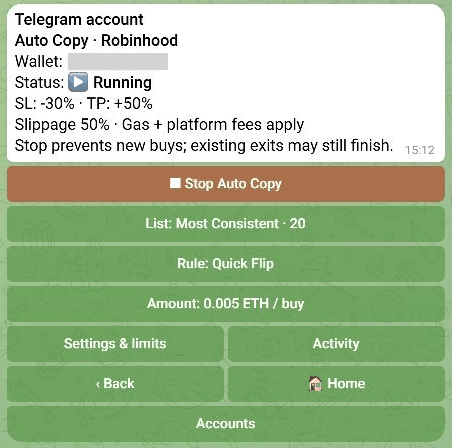
Example settings, not recommended trading parameters. Your selected account and saved configuration may differ.
| I want to… | Open |
|---|---|
| Connect my web account or select a wallet | Accounts and wallets |
| Copy future matching trader buys automatically | Auto Copy |
| Browse trader activity and choose a buy myself | Copy Feed and 1-tap |
| Buy, sell or sell several holdings | Trading and Batch Sell |
| Check points, rank or a referral link | Points and referrals |
| Understand a paused view or failed action | Troubleshooting |
The account label above each card matters: Telegram account and Web account can control different wallets. Switching the selected account does not transfer funds or move an existing copy session.
These guides describe the verified Robinhood Chain workflows. Check the network on the actual trade or deposit screen; a network appearing in a selector does not mean every feature is available there.