Auto Copy in Telegram
Auto Copy watches for future matching buys from selected traders. It does not buy their existing portfolio when you press Start.
Set up a run
- Open Auto Copy or
/copyand check the account and wallet. - Choose a trader list. Use a preset or create a custom saved list; inspect its members before choosing it.
- Choose a rule and review its details. Set Amount per buy, exit settings and filters.
- Keep enough ETH for buys, fees and gas. Review the setup and press Start Auto Copy when ready.
- Wait for the status to confirm the run. A Starting card is not confirmation that execution is ready.
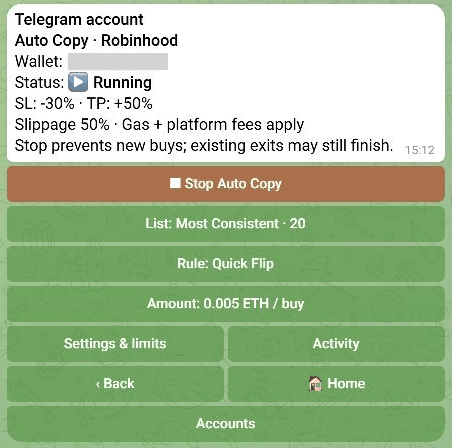
Example run. Do not copy these amounts or limits without reviewing your own settings.
Inspect or change lists and rules
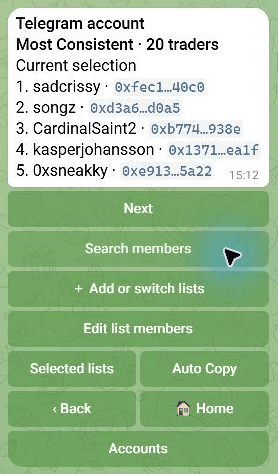
Tap List: … to see members, browse pages or search by trader name. The list name is not a search field. Choose Search traders when editing members.
You can add or switch lists and edit members in a draft. Combined lists deduplicate overlapping trader wallets. Presets and your saved copies can share a name: inspect the membership, not just the label.
Tap Rule: … to inspect the current rule, choose another or customize it. Switching a rule preserves the buy amount unless you explicitly change that amount.
Apply a change to a running bot
- Prepare the list, rule or amount change.
- Review the proposed setup, account and wallet.
- Choose Apply & restart to replace the active setup through a stop/start transition.
- Check the resulting status and settings. If a response is uncertain, open
/copybefore repeating the action.
Saving a draft does not silently change the active run. Discard keeps the current setup. Existing purchases retain their exit plans; changing the entry rule does not rewrite every open position.
Status and stopping
| Status | What to do |
|---|---|
| Stopped | Review a setup before starting. |
| Starting | Wait and refresh; execution is not yet confirmed. |
| Running | Check Activity for actual copies, skips or failures. Running does not guarantee every signal will trade. |
| Blocked / readiness warning | New buys may be prevented. Read the reason and open Activity; see Troubleshooting. |
Stop Auto Copy prevents new buys. Submitted trades and existing exit plans may still finish. Stopping is not a sell-all action.
The default Auto Copy slippage is currently 50%; saved values take precedence. Manual Swap/1-tap uses a separate setting. Wide slippage permits a worse fill; it is not a promise that a route will pass safety checks.